
Layout
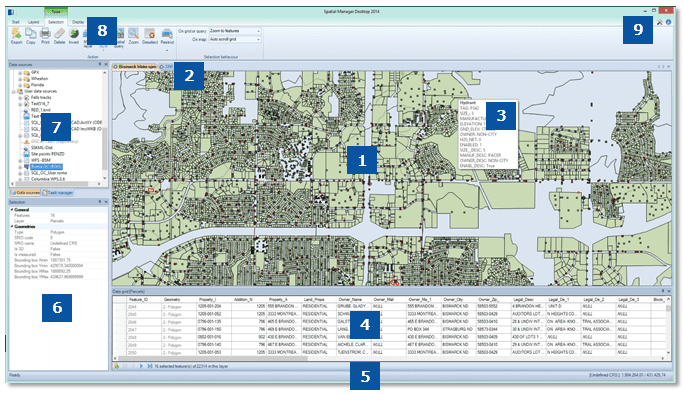
- Maps workspaces.
- Workspaces tabs. Workspace navigation tools on the right side.
- Data tooltip of the feature under the cursor.
- Data grid panel. Navigation, information, and other tools on the bottom.
- Status and information line.
- Properties panel. Content varies depending on the active focus (map, source, task — “Professional” edition only —, etc.).
- Data sources and task manager (“Professional” edition only) panels (grouped in this picture).
- Ribbon. Permanent and contextual tabs.
- Other tools (options and preferences, release information, etc.).
Disclaimer:
- Some components shown here (providers, names, window styles, etc.) may differ slightly from those on your computer.
- Certain features require Internet access. If you experience issues, check with your network administrator about a possible Proxy server. You can configure the Proxy settings in the application options.
- Some geographic data providers (Geocode, image maps, etc.) may require a user account, which you can set up in the Service Provider API Keys section of the application options.