
Points to Polygon
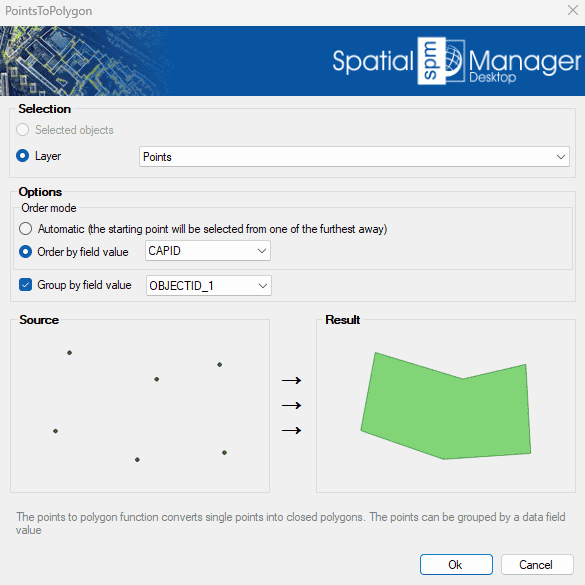
Creates closed polygon geometries by connecting individual points in sequence. This tool is particularly useful when reconstructing area features from boundary points, such as land plots or enclosures. Points can be grouped by a specified data field, enabling the generation of multiple polygons based on categorized point sets..
Points to Polygon Options
- Selection: select the polylines from the previous selection, or select by layer.
- Points to Polygon options
- Order mode:
- Automatic: The polygon creation begins at the furthest point from all selected points. Each following point is selected as the nearest point from those remaining.
- Order by field value: If the points have an associated field value, you can choose to create the polygon based on that value ascending order.
- Group by field value: If the points have an associated field value, you can choose to create separate polygons for each unique field value.
- Order mode:
Disclaimer:
- Some components shown here (providers, names, window styles, etc.) may differ slightly from those on your computer.
- Certain features require Internet access. If you experience issues, check with your network administrator about a possible Proxy server. You can configure the Proxy settings in the application options.
- Some geographic data providers (Geocode, image maps, etc.) may require a user account, which you can set up in the Service Provider API Keys section of the application options.