
Points to Polyline
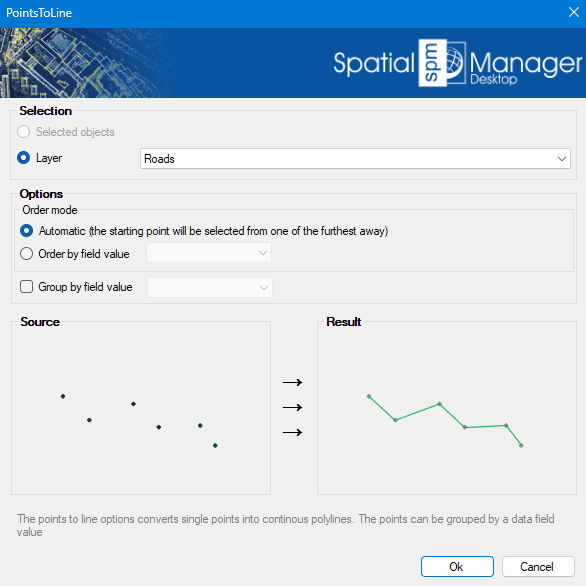
Transforms individual points into continuous polylines by connecting them in the order they appear or based on a selected attribute. This feature is ideal for generating linear features such as routes or boundaries from point data. Points can be grouped by a specific data field, allowing for the creation of multiple polylines from categorized point sets..
Points to Polyline Options
- Selection: select the polylines from the previous selection, or select by layer.
- Points to Polyline options
- Order mode:
- Automatic: The polyline creation begins at the furthest point from all selected points. Each following point is selected as the nearest point from those remaining.
- Order by field value: If the points have an associated field value, you can choose to create the polyline based on that value ascending order.
- Group by field value: If the points have an associated field value, you can choose to create separate polylines for each unique field value.
- Order mode:
Disclaimer:
- Some components shown here (providers, names, window styles, etc.) may differ slightly from those on your computer.
- Certain features require Internet access. If you experience issues, check with your network administrator about a possible Proxy server. You can configure the Proxy settings in the application options.
- Some geographic data providers (Geocode, image maps, etc.) may require a user account, which you can set up in the Service Provider API Keys section of the application options.