
Overlay
Allows you to create new features based on geometric and data operations between two existing feature groups. These operations are':' Intersect, Union, Erase, Identity, Clip, Paste and Symmetric Difference.
Overlay
The Overlay function in Spatial Manager Desktop™ allows you to create new features based on geometric and data operations between two existing feature groups.
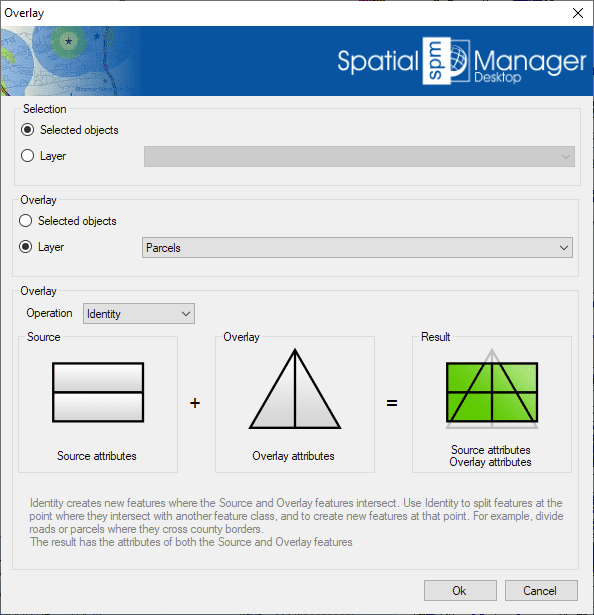
This function allows you to generate new features in a new layer of the map by performing geometric operations between two groups of existing features: “Selection” (Group 1) and “Overlay” (Group 2). For example, according to the chosen parameters in this image, for all selected features (roads, etc.) that are located within any parcel, the Overlay Identity function will create new features which are equal to the Selection features split at the parcel boundaries.
- Selection: See the section “features selection” above (Group 1 and Group 2).
- Overlay parameters and options:
- Operation:
- Intersect: Determines the geometries that overlap in the Selection and Overlay feature groups. Anything that does not overlap is discarded from the output, so the resulting features represent what the Selection and Overlay have in common. For example, find tree point features that are within park polygons. The resulting data table will include the data of both the Selection and Overlay features.
- Union: Determines the geometries that exist in either the Selection or Overlay features. Where the geometries intersect, additional features are created. Use this to combine two groups of related polygons. The resulting data table will include the data of both the Selection and Overlay features.
- Erase: Determines the geometries from the Selection features that do not intersect with the Overlay features. Use this to subtract portions of a group of features. The resulting data table will include the data of the Selection features only.
- Identity: Creates new features where the Selection and Overlay features intersect. Use this to split features at the point where they intersect with another features group. The resulting data table will include the data of both groups.
- Clip: Creates features from the areas of the Selection that overlap with the Overlay, keeping only the Selection data.
- Paste: Creates new features by combining Overlay features with non-overlapping portions of the Selection. The resulting data table will include the data of both groups.
- Symmetric Difference: Determines the areas in the Selection and Overlay that do not overlap. Overlapping areas are discarded. The resulting data table will include the data of both groups.
- Operation:
Disclaimer:
- Some components shown here (providers, names, window styles, etc.) may differ slightly from those on your computer.
- Certain features require Internet access. If you experience issues, check with your network administrator about a possible Proxy server. You can configure the Proxy settings in the application options.
- Some geographic data providers (Geocode, image maps, etc.) may require a user account, which you can set up in the Service Provider API Keys section of the application options.