
Centroids
Allows you to generate polygon Centroids (Point objects) by adopting the polygons data, or add Centroids data to the polygons that contain them.
Centroids
The command SPMCENTROID in Spatial Manager™ for AutoCAD includes two functionalities:
- Generate centroids (point objects) for the selected polygons. The polygon data, if any, will also be attached to the centroid objects.
- Capture the selected centroid data to add it to a copy of the selected polygons that contain them.
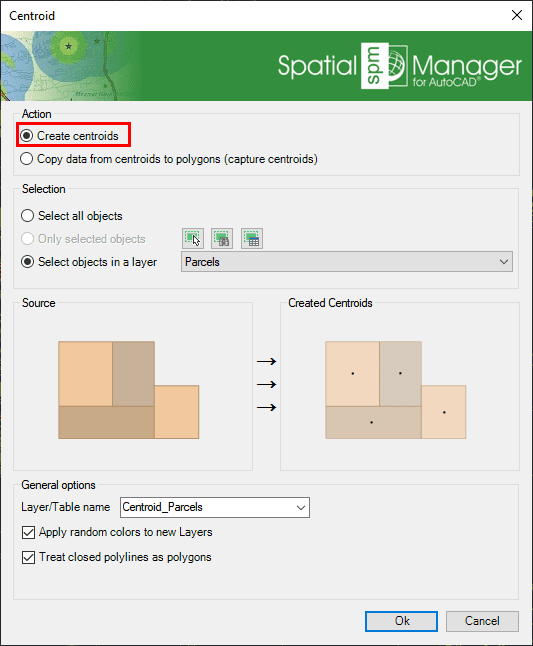
- Objects selection: Review selection control.
- Table/Layer name: Defines the target Layer and data table name for the centroids.
- Apply random colors to new Layers.
- Treat closed polylines as polygons: When checked (default value), all closed polylines are considered polygons.
Copy data from centroids to polygons (capture centroids)
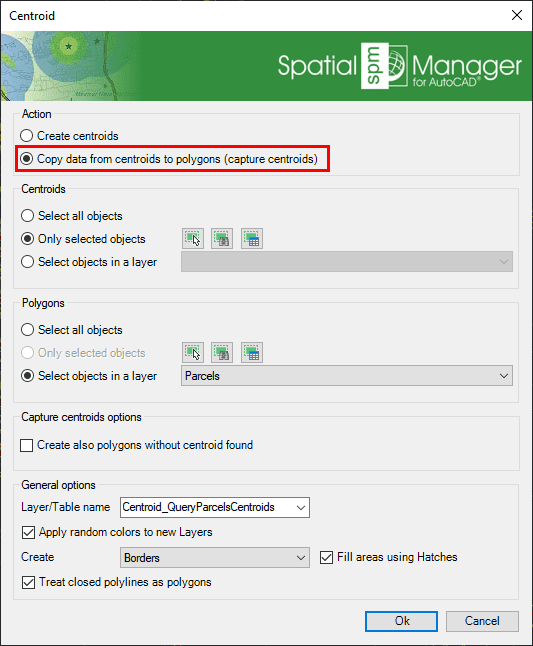
- Centroids selection: Any point object.
- Polygons selection: Any polygonal object.
- Capture centroids options:
- Create also polygons without centroid found.
- Table/Layer name: Defines the target Layer and data table name for the created polygons.
- Apply random colors to new Layers.
- Create: Duplicate polygon object type, borders, or polygons.
- Fill areas using Hatches.
- Treat closed polylines as polygons: When checked (default value), all closed polylines in the drawing will be considered polygons.
Disclaimer:
- Some components shown here (providers, names, window styles, etc.) may differ slightly from those on your computer.
- Certain features require Internet access. If you experience issues, check with your network administrator about a possible Proxy server. You can configure the Proxy settings in the application options.
- Some geographic data providers (Geocode, image maps, etc.) may require a user account, which you can set up in the Service Provider API Keys section of the application options.