
Spatial query
Select objects in the drawing according to the result of advanced simple or compound spatial queries by the following geometric operations..
Select objects based on their geometric relationship
The command SPMSPATIALQUERY in Spatial Manager™ for AutoCAD allows you to select objects in the drawing according to the result of advanced simple or compound spatial queries.

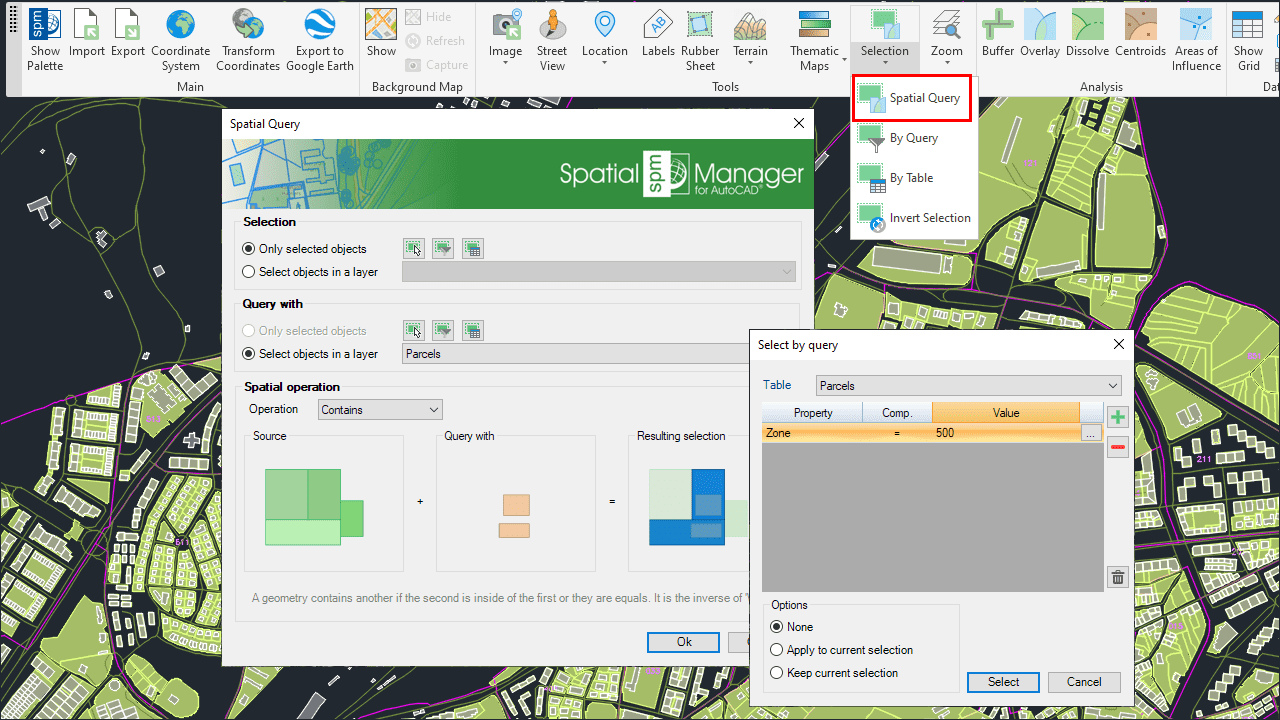
Advanced selection by processing Spatial Queries.
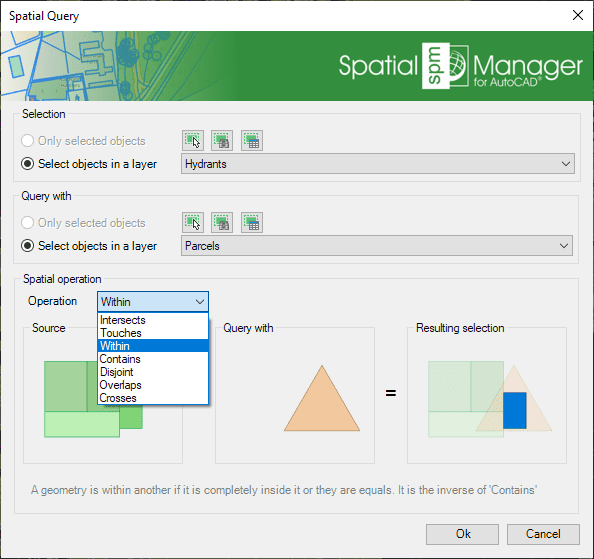
This function allows you to select objects in the drawing by performing geometric operations between two groups of objects: “Selection” (Group 1) and “Query with” (Group 2). For example, according to the chosen parameters in this image, all the hydrants (points) that are located within a parcel (polygons) would be selected.
- Parameters and options
- Objects selection (Group 1 and Group 2) (review selection control options).
- Spatial operation
- Intersects: A geometry intersects another one if they have at least a point in common. It is the opposite of ‘Disjoint’. For example, combined with Buffers, objects that are located at a certain distance from other objects, which will normally be points or linear objects (such as buildings located at a certain distance from road or street axes, etc.).
- Touches: A geometry touches another one if they have common points only at their boundaries, without intersection, and none of them contains or is equal to the other. For example, buildings touching another building within a block of contiguous buildings (the drawing must be very precise because no intersections should occur).
- Within: A geometry is within another one if it is completely inside or they are equal. It is the inverse of ‘Contains’. For example, to select points representing pharmacies within a neighborhood, polygons representing hospitals within a municipality, or buildings within a parcel, etc.
- Contains: A geometry contains another one if the second one is completely inside the first one or they are equal. It is the inverse of ‘Within’. For example, to select all the parcels in a municipality that contain one or more buildings.
- Disjoint: A geometry is disjoint from another one if they do not have any points in common (that is, “out of”: It does not intersect and does not touch). It is the opposite of ‘Intersects’.
- Overlaps: A geometry overlaps another one if they have areas in common, but neither is fully inside the other and they are not equal. For example, polygons that intersect but none of them are completely inside each other, i.e., “they cross”. A practical case could be the selection of buildings in one municipality that are located partially within the boundary of the municipality and partially within the boundary of another adjacent municipality.
- Crosses: A geometry (linear object) crosses another one if it has at the same time parts inside and outside the second one. For example, to select road sections that are partially located within the boundaries of two or more municipalities.
Note: You can use the command SPMZOOMTOSELECTION to quickly zoom to the selection extent.
Disclaimer:
- Some components shown here (providers, names, window styles, etc.) may differ slightly from those on your computer.
- Certain features require Internet access. If you experience issues, check with your network administrator about a possible Proxy server. You can configure the Proxy settings in the application options.
- Some geographic data providers (Geocode, image maps, etc.) may require a user account, which you can set up in the Service Provider API Keys section of the application options.