
Reference drawing
This section explains how to reference a drawing and assign its location by setting a Coordinate Reference System (CRS). A valid CRS is required for Spatial Manager functions, and it can be assigned, modified, or undefined using the SPMSETCRS command.
Reference the drawing and set location
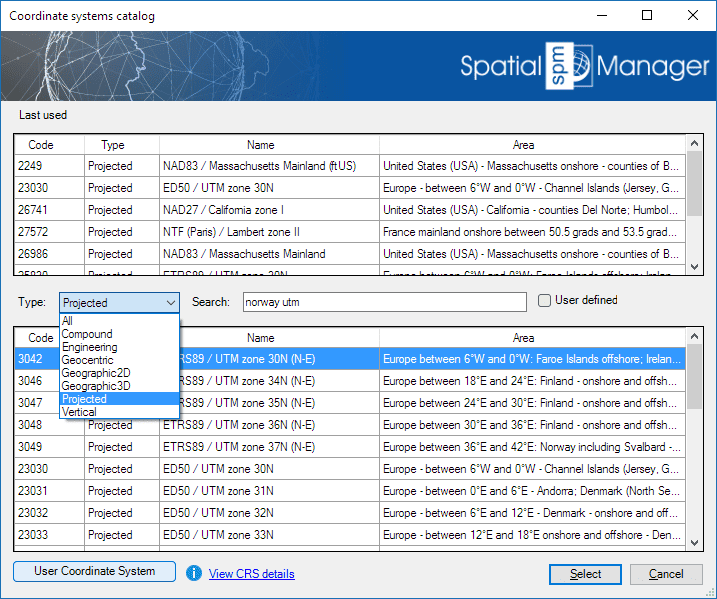
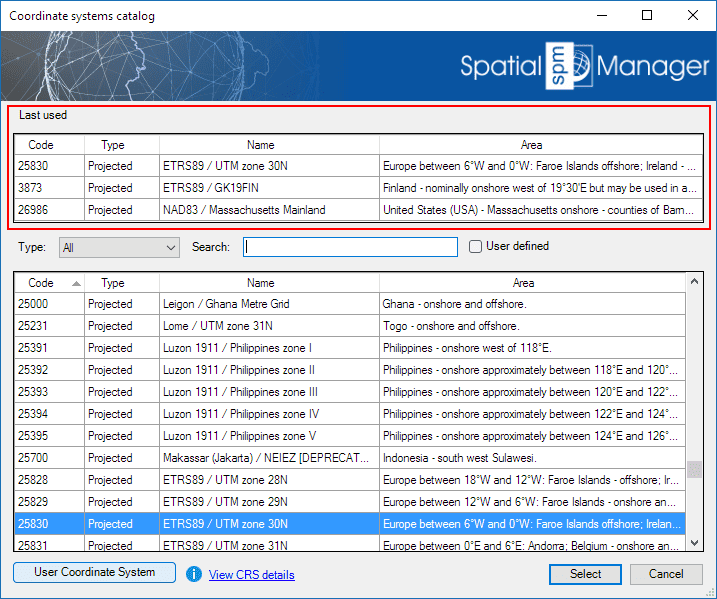
If the drawing is not empty when some commands are executed, it is necessary that the drawing has been assigned a Coordinate Reference System (CRS), which is required for several functions in Spatial Manager to work correctly. If this is not the case, you can assign a CRS to the drawing (and modify it) using the command SPMSETCRS of Spatial Manager™ for ZWCAD. By executing this command, you will access the CRS catalog of the application where you can:
- Filter the CRSs by type (Geocentric, Projected, etc.). The type “Projected” will be selected by default because it is the most common choice.
- Choose a CRS by clicking on its row in the table.
- Search CRSs by typing the search criteria in the “Search” box. You can type here as many words as you like separated by blanks. The application will find all the rows including all these words in any column of the table.
-
Unassign (undefine) the Coordinate System of the drawing by choosing “Undefined CRS” (EPSG 0).
- Notes:

Note: Read more about Coordinate Systems, Coordinate Systems Transformation and how to define and select User Coordinate Systems in the Import or Export articles.
Disclaimer:
- Some components shown here (providers, names, window styles, etc.) may differ slightly from those on your computer.
- Certain features require Internet access. If you experience issues, check with your network administrator about a possible Proxy server. You can configure the Proxy settings in the application options.
- Some geographic data providers (Geocode, image maps, etc.) may require a user account, which you can set up in the Service Provider API Keys section of the application options.