
Sheets definition
Create a grid over selected objects or a defined area in your drawing. This grid serves as the foundation for generating Map Books, organizing your project into consistent map sections..
Define Sheets for Map Books
The SPMMAPBOOKSHEETS command in Spatial Manager™ for ZWCAD allows you to define the individual sheets that will make up your map book. This is the essential first step before generating a map book, as it establishes the coverage, scale, and properties of each sheet.

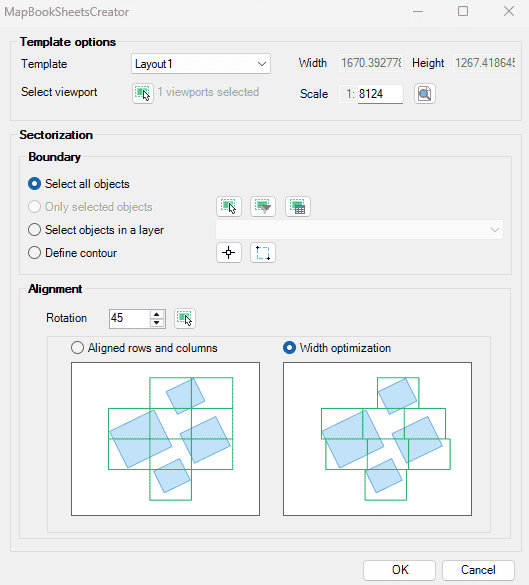
Map Book Sheets Options
- Template options:
- Template: select a layout as template to be used for defining the sheets.
- Width/Height: automatically set by the template and scale.
- Selected viewport: select a viewport in the template layout to be used for the sheet, by default the largest one is selected.
- Scale: define the scale for the sheet, by default the current viewport scale is used, but can be changed to a custom one.
- Boundary:
- Selection: use the selection control tools.
- Define contour: or define a create a contour for the map book area.
- Alignment:
- Rotation: the sheets can be aligned to the boundary or set to a fixed rotation angle.
- Aligned rows and columns: the sheets can be aligned to each other in rows and columns.
- Width optimization: the sheets can be optimized for width to minimize empty space and number of resulting sheets.
Map Book Sheets video
Disclaimer:
- Some components shown here (providers, names, window styles, etc.) may differ slightly from those on your computer.
- Certain features require Internet access. If you experience issues, check with your network administrator about a possible Proxy server. You can configure the Proxy settings in the application options.
- Some geographic data providers (Geocode, image maps, etc.) may require a user account, which you can set up in the Service Provider API Keys section of the application options.