
Persistent
Once a thematic map is defined, you can apply the chosen styling persistently across your DWG drawing..
Persistent Thematic Maps
Thematic Maps can now be made persistent, which means the color changes are applied directly to the entities’ properties rather than being only a temporary visual representation. When you make a Thematic Map persistent:
- The colors defined in the Thematic Map styles are permanently applied to the entities.
- The visual appearance of the entities is modified directly in the drawing.
- The thematic color representation becomes part of the entity properties and is preserved even after closing and reopening the drawing.
This feature is particularly useful when you want to maintain the thematic visualization as a permanent part of your drawing, or when you need to share the drawing with users who don’t have Spatial Manager™ for ZWCAD installed.
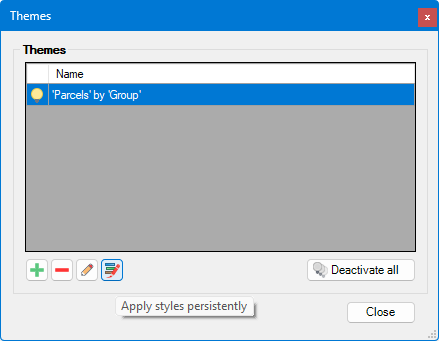
Once a thematic map is created, you can make it persistent from the window that appears running the SPMTHEMATICMAP command by clicking the “Apply persistent theme” button:
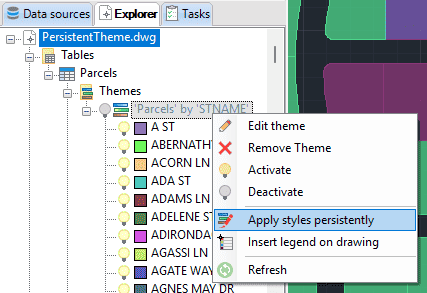
Or also searching the thematic map in the Explorer, right-clicking on it, and selecting Apply styles persistently from the context menu:
Review this video about this feature:
Note: Thematic Maps are only available in ZWCAD 2022 (64-bit) and later 64-bit versions.
Disclaimer:
- Some components shown here (providers, names, window styles, etc.) may differ slightly from those on your computer.
- Certain features require Internet access. If you experience issues, check with your network administrator about a possible Proxy server. You can configure the Proxy settings in the application options.
- Some geographic data providers (Geocode, image maps, etc.) may require a user account, which you can set up in the Service Provider API Keys section of the application options.