
Direct geocoding
Insertion of points in the drawing from postal addresses
Load texts from CSV files and seek for their coordinates. Resulting points includes attached data.
Insert drawing Points from a geographic data table
Geocoding is the process of converting postal addresses into geographic coordinates (latitude and longitude). Spatial Manager™ for ZWCAD includes the SPMGEOCODING_DIRECT command that allows you to compose addresses from a geographic data file (CSV, TXT, etc.) and geocode these addresses through a Geocode provider (Google, Bing, OpenStreetMap). Once you load the geographic file, you can preview the resulting table, configure some file parameters (such as the fields delimiter, etc.), select (add or remove) and sort the appropriate fields, and select the provider to geocode from the list.


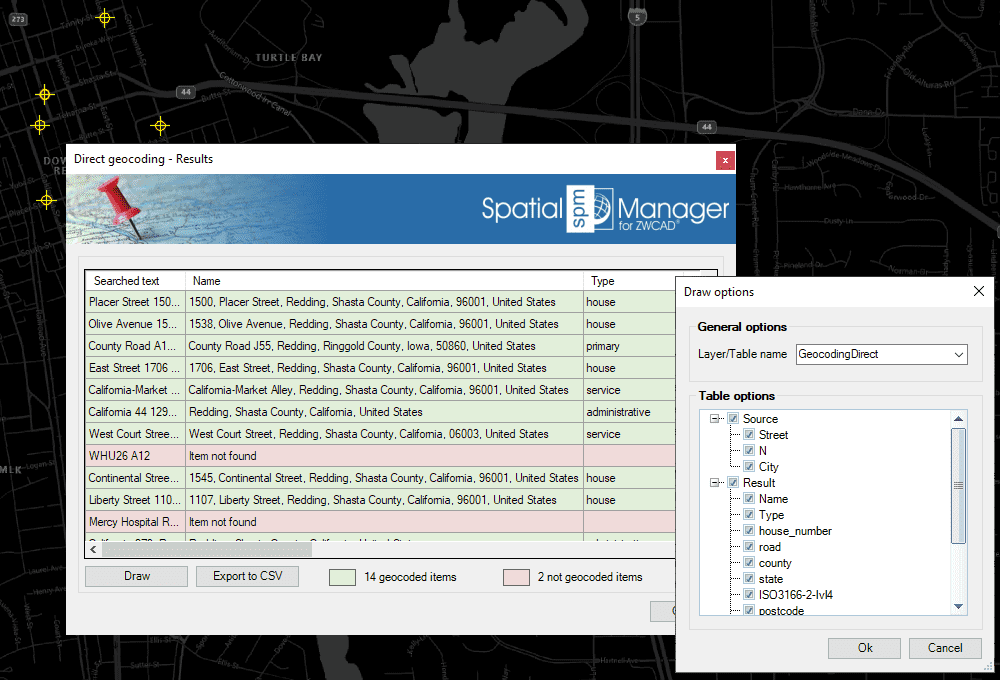
Once the direct geocoding process is finished, you will get a results table including all the fields returned by the chosen geocoding service. Those addresses that could not be geocoded (perhaps due to insufficient or inconclusive data) are shown in a different color. From the results of the table, you can:
- Draw the geocoded Points: Enter the name of the Layer and attached Table name for the created points, and select the fields that will be included in this table from the source and result data.
- Export the table to a CSV file: Select the exporting to CSV parameters (delimiter, separator, etc.). You can also opt to omit in the exported CSV the addresses that have not been geocoded.
- Notes:
- Certain geocoding providers (such as Google or Bing) may require special terms of use for the users of this service. You can configure any special setting for such providers through the Service Provider API Keys in the application Options (‘SPMOPTIONS’).
- If you select a large number of addresses to geocode, the application will warn you that this operation may involve high data consumption depending on the geocoding provider chosen.
- If the drawing is not empty when ‘SPMGEOCODING_DIRECT’ is executed, it is necessary that the drawing has been assigned a Coordinate Reference System (CRS), learn how to georeference a drawing.
- If the drawing is empty and has no coordinate system assigned to it, when SPMGEOCODING_DIRECT is executed Spatial Manager™ for ZWCAD will assign the CRS Code:3857 (WGS84 / Pseudo-Mercator) to the drawing. This CRS is valid for any Earth area, but may be inaccurate for measurements in some areas.
Disclaimer:
- Some components shown here (providers, names, window styles, etc.) may differ slightly from those on your computer.
- Certain features require Internet access. If you experience issues, check with your network administrator about a possible Proxy server. You can configure the Proxy settings in the application options.
- Some geographic data providers (Geocode, image maps, etc.) may require a user account, which you can set up in the Service Provider API Keys section of the application options.