
Grid files
The application allows loading custom grid files for NTv2(.gsb) and Nadcon(.las/.los) coordinate transformations..
Transformation using Grid files
Some coordinate transformations (NTv2, etc.) require one or more Grid files in order to be processed. Some of the most commonly used Grid files worldwide are included in the application. However, some Grid files are not included because of their large size or the distribution terms governing those files. In such cases, the application provides instructions on where to obtain the required Grid file(s), usually including a download URL.
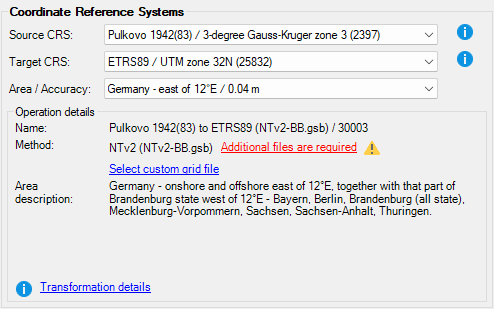
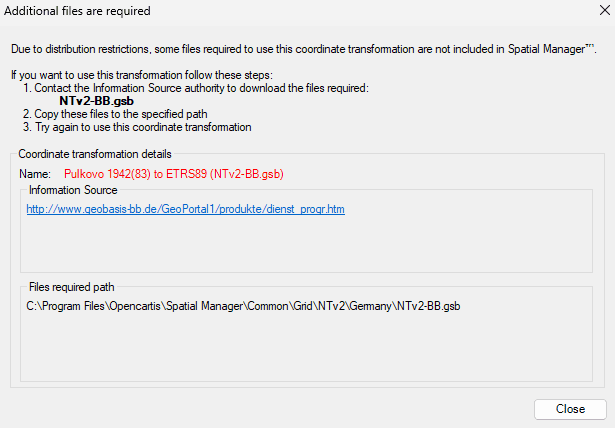
When you click “Additional files are required” link, the application will show you the details of the required Grid file(s):
- Name of the grid file(s) (including the expected file name and extension)
- Information source (e.g. the organization responsible for the grid file(s) and/or the download URL)
- File path: where the file must be copied in order to be used by the application, the application will automatically use the grid file on the next run.
Use custom Grid files
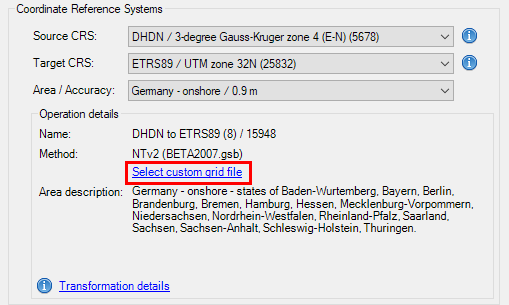
On the other hand, even if the required Grid file(s) already exist (included as standard in the application, or previously downloaded by the user), the application allows the user to choose alternative Grid file(s) so that it can use more accurate or updated Grid transformations when more appropriate files are available. This custom choice for a Grid file is kept by default for a work session, but will not be saved after closing and reopening the application.
Disclaimer:
- Some components shown here (providers, names, window styles, etc.) may differ slightly from those on your computer.
- Certain features require Internet access. If you experience issues, check with your network administrator about a possible Proxy server. You can configure the Proxy settings in the application options.
- Some geographic data providers (Geocode, image maps, etc.) may require a user account, which you can set up in the Service Provider API Keys section of the application options.