
Polygonize
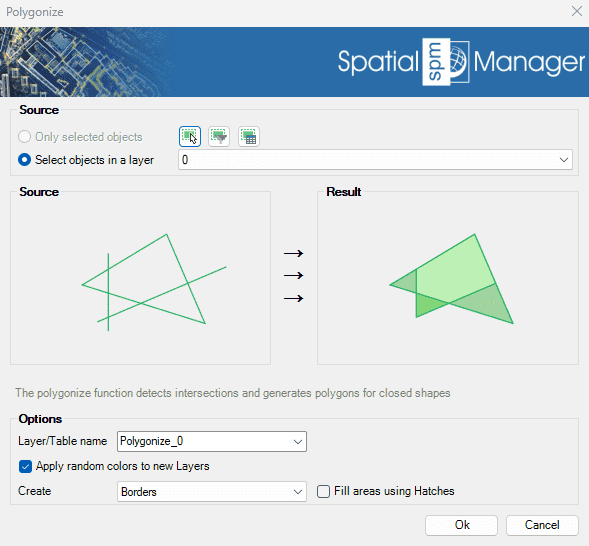
Automatically detects intersections between line geometries and generates polygons from the resulting closed shapes. This tool is ideal for transforming networks of lines—such as cadastral boundaries or urban layouts—into usable polygon features..
The SPMPOLYGONIZE command converts closed polylines into polygon entities, or creates polygons from collections of polylines that form closed boundaries.

Polygon Union Options
- Source: select the points to convert (review selection control options).
- Options
- Layer/Table name: specify the layer where the created polygons will be placed and the table name for attached data.
- Apply random colors to new layers: if checked, the created layers will be assigned random colors.
- Create: borders (closed polylines) or polygons.
- Fill with hatches/polygons: the resulting closed polylines can be filled with hatches, and the resulting closed polygons can be filled with fill options.
Polygonize video
Disclaimer:
- Some components shown here (providers, names, window styles, etc.) may differ slightly from those on your computer.
- Certain features require Internet access. If you experience issues, check with your network administrator about a possible Proxy server. You can configure the Proxy settings in the application options.
- Some geographic data providers (Geocode, image maps, etc.) may require a user account, which you can set up in the Service Provider API Keys section of the application options.