
Aggregate Line
Generates a single polyline by combining multiple existing polylines. When the polylines are not connected, the application can automatically join them based on proximity. Additionally, this process allows grouping and aggregation of polylines according to a specific field value, offering a flexible way to organize and simplify complex line geometries..
The SPMAGGREGATELINE command connects separate line segments or different polylines into continuous polylines.
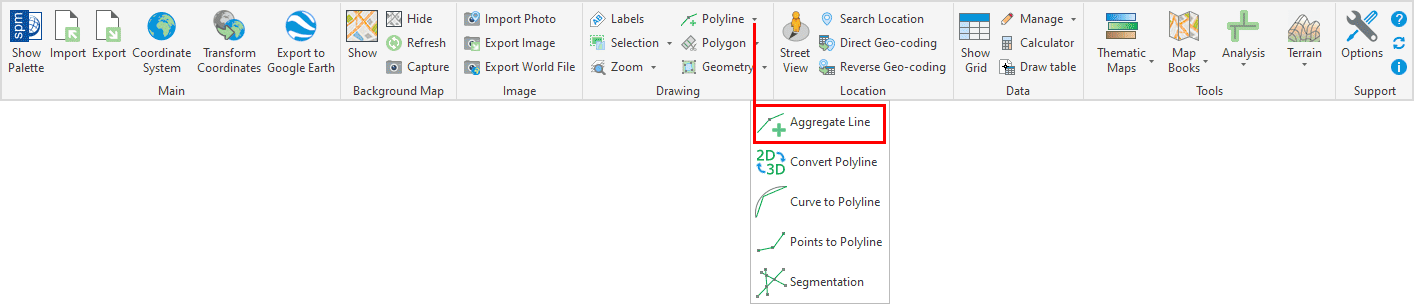
Aggregate Line Options
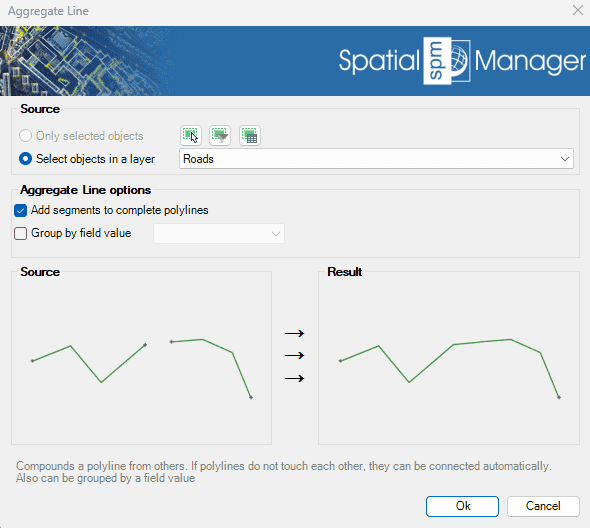
- Source: select the polylines to aggregate (review selection control options).
- Aggregate Line options:
- Add segments to complete polylines: If polylines do not touch each other, they will be connected creating new segments. If unchecked, only polylines that touch each other will be connected.
- Group by field value: If checked, the polylines will be grouped by the value of the selected field, creating polylines for the same value. If unchecked, all polylines will be joined into one polyline.
Aggregate Line video
Disclaimer:
- Some components shown here (providers, names, window styles, etc.) may differ slightly from those on your computer.
- Certain features require Internet access. If you experience issues, check with your network administrator about a possible Proxy server. You can configure the Proxy settings in the application options.
- Some geographic data providers (Geocode, image maps, etc.) may require a user account, which you can set up in the Service Provider API Keys section of the application options.