
Create
Create atlas-like layouts automatically within BricsCAD. Ideal for large areas, this feature helps you organize and print multi-page maps with consistent viewports, titles, and layouts.
The SPMMAPBOOK command in Spatial Manager™ for BricsCAD automates the generation of map book sheets based on the sheet definitions you’ve created. This command processes all defined sheets and creates individual layouts or drawings for each one.
Create a Map Book

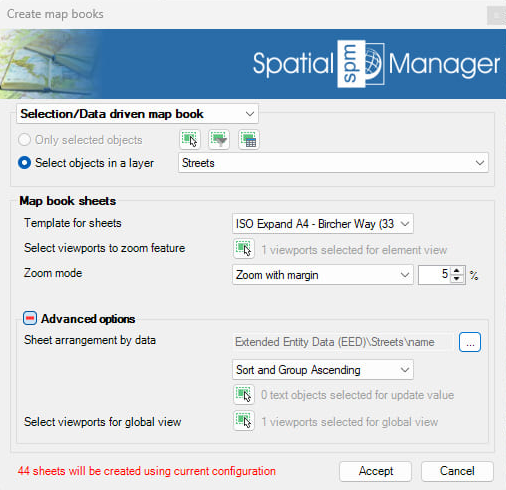
Map Book Options
- In the first options group:
- Selection/Data driven map book: creates a sheet for each feature in a selected layer or by their data.
- Map book from sheets: creates a map book based on previously defined sheets or create new sheets.
- Map book sheets
- Template for sheets: select a layout or drawing template to be used for each sheet in the map book.
- Viewports to zoom feature: automatically selects the largest viewport in the template to zoom to the feature extent, it can be selected manually as well.
- Zoom mode:
- Zoom: zooms to the feature extent.
- Zoom with margin: zooms to the feature extent with a specified margin percentage.
- Zoom to best fitting predefined scale: adjusts the view to the best fitting predefined scale.
- Center view in current scale: centers the view, but does not change the scale.
- Advanced options
- Sheet arrangement by data: allows to create a sheet grouping by the same attribute or property value. The value will be used for the layout name.
- Sort and group: sort ascending or descending and group the the selected data into the same sheet.
- Text value: the selected data can also be set as a custom text value in the layout, click and select the text object to be replaced in the template layout.
- Viewport for global view: select a viewport in the template layout to be used as a global view, which will not be zoomed to the feature extent, only centered on the feature with the existing viewport scale.
Map Book video
Note: there is a limit of 256 layouts for BricsCAD drawings, if the selected options exceed this limit, the process can not be completed.
Disclaimer:
- Some components shown here (providers, names, window styles, etc.) may differ slightly from those on your computer.
- Certain features require Internet access. If you experience issues, check with your network administrator about a possible Proxy server. You can configure the Proxy settings in the application options.
- Some geographic data providers (Geocode, image maps, etc.) may require a user account, which you can set up in the Service Provider API Keys section of the application options.