
Buffer
Generate Buffered polygons around point, linear or polygonal objects.
Buffer
A buffer is a zone around a geographic feature, defined by a specific distance. The command SPMBUFFER in Spatial Manager™ for BricsCAD allows you to generate buffered polygons around point entities, linear entities, or polygon boundaries. Buffer distance can be constant or taken from the value of a table field for each entity. It is possible to merge the generated entities in their common areas, and different styles of joins and endings can be chosen.
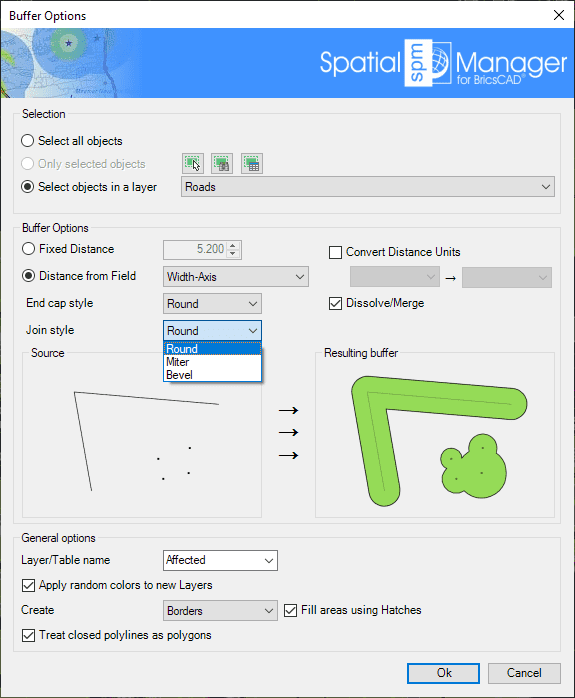
- Entities selection: Review the section selection control.
- Buffer options: You can select the buffer distance (fixed value or field-based value), the distance units (read below), the join and end cap styles, and whether you want to dissolve/merge the generated buffered polygons.
- About units conversion: If a coordinate system with a defined unit of measurement is assigned to the drawing, the user can select another unit from the drop-down list to define the entered buffer distance, and the application will perform the conversion between it and the unit defined by the coordinate system. If the drawing does not have a coordinate system assigned to it, or the coordinate system does not have defined units, the user can select from the drop-down lists the unit in which the entered buffer distance is defined and the drawing units. The application will perform the conversion between the two.
- Table/Layer name: This setting defines the target Layer and data table name for the buffers. You can select an existing Layer in the drawing, or you can write the name to create a new Layer. Buffer entities will adopt the same data as the entities that generate them, unless the “Dissolve/Merge” option has been checked, in which case this would not make sense and the combined buffer entities are not attached to any data table.
- Apply random colors to new Layers.
- Create: Buffer entities type, borders, or polygons. The polygons option allows you to select MPolygons as the type of entity to use (BricsCAD 20 and later). The MPolygons can be defined by multiple rings, even including holes, as a single BricsCAD entity.
- Fill areas using Hatches.
- Treat closed polylines as polygons: When checked (default value), all closed polylines in the drawing will be considered as polygons and not as linear entities. Most of the time, closed polylines represent polygonal elements.
Disclaimer:
- Some components shown here (providers, names, window styles, etc.) may differ slightly from those on your computer.
- Certain features require Internet access. If you experience issues, check with your network administrator about a possible Proxy server. You can configure the Proxy settings in the application options.
- Some geographic data providers (Geocode, image maps, etc.) may require a user account, which you can set up in the Service Provider API Keys section of the application options.