
Commands
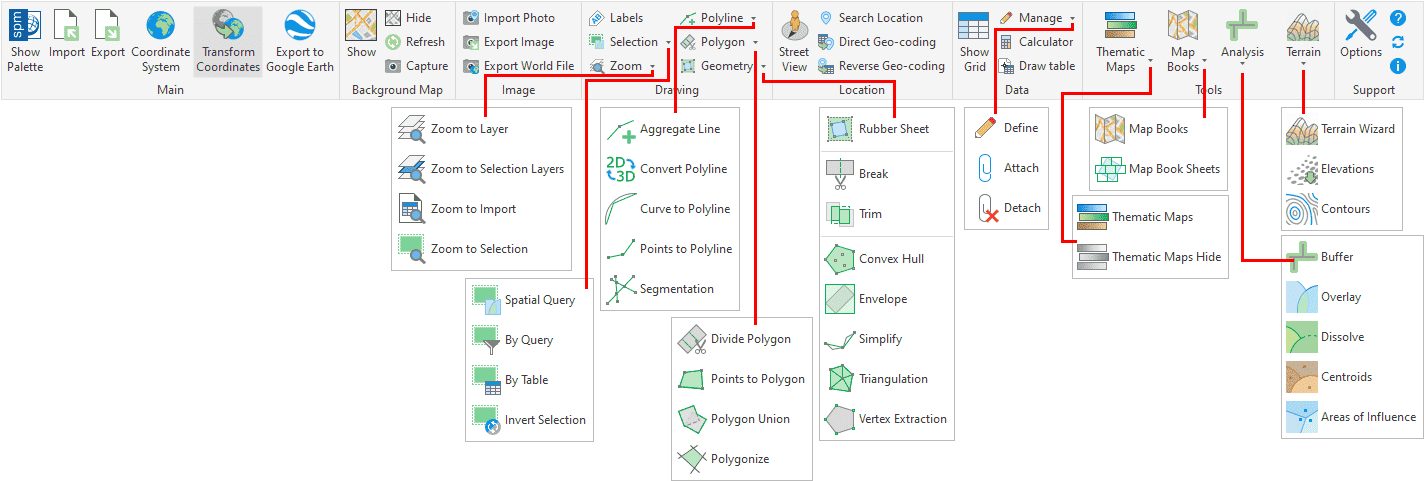
List of GstarCAD commands included in Spatial Manager™ for GstarCAD:
Main commands
- SPM: Show Palette. Opens and/or displays the main application Palette.
- SPMIMPORT: Import. Directly imports features from geospatial files or tables without using the main application Palette.
- -SPMIMPORT [Task name]: Import (Command Line). Execute Task(s) from the command line, useful in scripts, etc. (“Professional” edition only).
- SPMEXPORT: Export. Exports GstarCAD entities into geospatial files or tables (“Professional” edition only).
- -SPMEXPORT [Parameters]: Export (Command Line). Exports GstarCAD entities from the command line, useful in scripts, etc. (“Professional” edition only).
- SPMSETCRS: Coordinate system. Sets the Coordinate Reference System (CRS) for the drawing. Includes options to define user CRSs.
- SPMTRANSFORMCRS: Transform Coordinates. Creates a new drawing transforming geometrically entities from the current one between two Coordinate Systems (“Professional” edition only).
- SPMCREATEKML: Export to Google Earth. Exports the current status of the drawing to Google Earth (one click) (“Standard” and “Professional” editions only).
- SPMCLOSE: Close. Closes all application Palettes (Main, Data Grid, Street View, etc.). In addition, it redefines the location and size defaults for when they are reopened.
Background Maps
Available on editionsStandardProfessional
- SPMBGMAPSHOW: Show. Displays the selected image Map in the drawing. Includes tools to manage the user Background Maps.
- SPMBGMAPHIDE: Hide. Hides the Background Map if it is displayed.
- SPMBGMAPREFRESH: Refresh. Regenerates the image of the Background Map, which may be needed under certain graphic situations.
- SPMBGMAPIMAGE: Capture. Creates a GstarCAD raster image corresponding to the display view of the current Background Map (Snapshot).
- SPMBGMAPIMAGEPURGE: Purge. Deletes ‘orphan’ image tiles and performs some other cleaning operations.
Image
Available on editionProfessional
- SPMIMPORTPHOTO: Import Images. Import of geo-referenced raster images and photos.
- SPMEXPORTIMAGE: Export Images. Export of geo-referenced images, geo-reference files and Coordinate System files.
- SPMWORLDFILE: Export Geo-reference Files. Export of images geo-reference and Coordinate System files (World, PRJ, etc.).
Drawing
- SPMLABEL: Entities Labeling. Texts based on entities data and properties.
- Selection
- SPMSPATIALQUERY: Spatial Query. Advanced entities selection based on geometric and data operations between existing entity groups (Intersect, Touches, Within, Contains, Disjoint, Overlaps or Crosses) (“Standard” and “Professional” editions only).
- SPMSELECTBYQUERY: By Query. Selects entities by a simple or compound query over their data (“Standard” and “Professional” editions only).
- SPMSELECTBYTABLE: By Table. Selects all the entities attached to a specific data table (“Standard” and “Professional” editions only).
- SPMSELECTINVERSE: Inverse Selection. Inverts current entities selection.
- Zoom
- SPMZOOMTOLAYER: Zoom to Layer. Zoom to the entities on the selected layers (by default on the current layer).
- SPMZOOMTOSELECTIONLAYER: Zoom to Selection Layers. Zoom to the entities on the layers of selected entities.
- SPMZOOMTOIMPORT: Zoom to Import. Zoom to the entities resulting from the last import process.
- SPMZOOMTOSELECTION: Zoom to Selection. Zoom to the selected entities.
Geometry Tools
Available on editionProfessional
- Polyline
- SPMAGGREGREGATELINE: Aggregate line. Connect separate line segments or polylines into continuous polylines, optionally adding segments and grouping by field value.
- SPMCONVERTPOLYLINE: Convert polyline. Convert polylines between different GstarCAD polyline types.
- SPMCURVETOPOLYLINE: Curve to polyline. Convert curved entities (arcs, circles, ellipses, splines) into polylines made of straight segments.
- SPMPOINTSTOPOLYLINE: Points to polyline. Create polylines from point sets, with ordering and grouping options and optional closing.
- SPMSEGMENTATION: Segmentation. Split polylines or polygons at all intersection points, generating non-overlapping segments.
- Polygon
- SPMDIVIDEPOLYGON: Divide polygon. Subdivide polygons using equal areas, equidistant strips, or custom area/percentage values.
- SPMPOINTSTOPOLYGON: Points to polygon. Create closed polygon entities from point sets, with ordering and grouping options.
- SPMPOLYGONUNION: Polygon union. Merge overlapping or adjacent polygons into unified polygons, removing internal boundaries.
- SPMPOLYGONIZE: Polygonize. Create polygons from closed polylines or from polyline collections that form closed boundaries.
- Geometry
- SPMRUBBERSHEET: Rubber Sheet. Elastically deform geometries by matching source/target control point pairs to align data.
- SPMBREAK: Break. Split entities at intersections with boundary entities.
- SPMTRIM: Trim. Remove portions of entities inside or outside boundary polygons, keeping only the desired parts.
- SPMCONVEXHULL: Convex hull. Create the smallest convex polygon that contains all selected entities.
- SPMENVELOPE: Envelope. Create minimum bounding rectangles (envelopes) around selected entities.
- SPMSIMPLIFY: Simplify. Reduce polyline complexity by removing vertices while respecting a tolerance.
- SPMTRIANGULATION: Triangulation. Create a TIN from the vertices of selected entities or from point entities.
- SPMVERTEX: Vertex extraction. Extract vertices from polylines or polygons and create point entities at each vertex.
Location
Available on editionProfessional
- SPMSTREETVIEW: Street View. Application palette for displaying (and navigating) dynamic Google Street View images on any geo-referenced drawing/map.
- SPMSEARCHLOCATION: Search Location. Search in the drawing for the location of geographical entities (streets, postal addresses, neighborhoods, etc.) based on the text entered.
- SPMGEOCODING_DIRECT: Geo-coding (Direct). Insertion of points in the drawing from postal addresses.
- SPMGEOCODING_REVERSE: Geo-coding (Reverse). Obtaining postal addresses from entities in the drawing.
Data Tables
Available on editionsStandardProfessional
- SPMDATATABLEGRID: Data grid. Opens and displays the ‘Data Grid’ palette (“Professional” edition only).
- SPMDATATABLEDEFINE: Define Table. Defines, restores, modifies, renames or deletes a data table or its fields.
- SPMDATATABLEATTACH: Attach. Attaches one or more entities to a data table.
- SPMDATATABLEDETACH: Detach. Detaches one or more entities from their corresponding attached data table.
- SPMDATACALCULATOR: Fields Calculator. Calculation of new or existing field values using arithmetic, mathematical, date, etc., expressions including constant values and/or values from other fields (“Professional” edition only).
- SPMDATATABLEDRAW: Draw Table. Draws the data table for the selected entities (“Professional” edition only).
Thematic Maps
Available on editionProfessional
- SPMTHEMATICMAP: Define Thematics. Definition and edition of thematic maps according to data field values.
- SPMTHEMATICMAPHIDE: Hide Thematics. Hide thematic viewings.
Map Books
Available on editionProfessional
- SPMMAPBOOK: Map books generation.
- SPMMAPBOOKSHEETS: Definition of sheets for map books.
GIS Analysis
Available on editionProfessional
- SPMBUFFER: Buffers. Buffered polygons around point entities, linear entities or polygon boundaries.
- SPMOVERLAY: Overlays. New entities based on geometric and data operations between existing entity groups (Intersect, Union, Erase, Identity, Clip, Paste or Symmetric Difference).
- SPMDISSOLVE: Dissolve. New polygons based on the grouping of other adjacent polygons with some common data.
- SPMCENTROID: Centroids. Polygon Centroids creation by adopting the polygons data, or add Centroids data to the polygons that contain them.
- SPMINFLUENCEAREAS: Areas of Influence. Polygons defined by the set of points closest to each point of a selection of points in the drawing (Voronoi diagrams).
Terrains
Available on editionProfessional
- SPMTERRAIN: Terrain. Create Terrains, Contours and elevation 3D Points. Command options:
- 1: 3D Points built by accessing Elevation service providers in any selected area.
- 2: 2D or 3D Contours from selected 3D Points.
- 3: Terrain wizard. Complete 3D Points, Contours and Terrains functionality.
Support
- SPMOPTIONS: Options. Set of parameters to configure the application (includes also the functionality of SPMUPDATE and SPMABOUT).
- SPMHELP: Help. Shows the application help.
- SPMUPDATE: Updates. Checks if there is a new application release to be downloaded from Internet.
- SPMABOUT: Information. Shows basic information about the application and the installed release.
Note: All the command names are also valid if you replace the prefix SPM with SPATIALMANAGER. For example, SPATIALMANAGERCREATEKML is equivalent to SPMCREATEKML, or SPATIALMANAGER is equivalent to SPM.
Disclaimer:
- Some components shown here (providers, names, window styles, etc.) may differ slightly from those on your computer.
- Certain features require Internet access. If you experience issues, check with your network administrator about a possible Proxy server. You can configure the Proxy settings in the application options.
- Some geographic data providers (Geocode, image maps, etc.) may require a user account, which you can set up in the Service Provider API Keys section of the application options.