
Divide Polygon
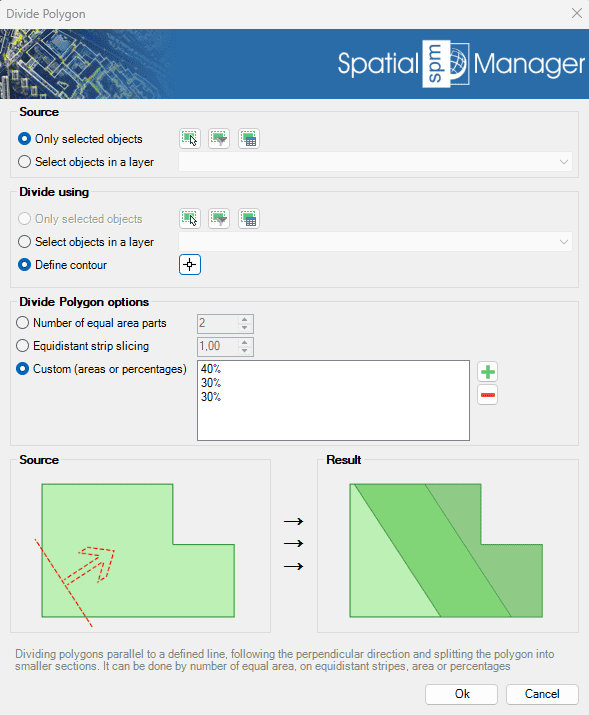
Splits polygons into smaller sections along lines parallel to a defined direction. This division can be based on a fixed number of parts, equal-area segments, equidistant stripes, or custom area percentages. The tool is ideal for land parceling, planning layouts, or preparing zoning maps, offering precision and flexibility in how the divisions are calculated and applied..
The SPMDIVIDEPOLYGON command provides powerful tools for subdividing polygon entities (closed polylines) into smaller parts using various division methods.

Divide Polygon Options
- Source: select the entities to divide (review selection control options).
- Divide using: select the line to divide by, or draw it manually. The line direction determines how the polygon will be divided.
- Divide Polygon options
- Number of equal area parts: specify the number of equal area parts to divide the polygon into.
- Equidistant strip slicing: specify the distance (in drawing units) between each slice to create equidistant strips.
- Custom (areas or percentages): specify custom fixed areas and/or percentages for division.
Divide Polygon video
Disclaimer:
- Some components shown here (providers, names, window styles, etc.) may differ slightly from those on your computer.
- Certain features require Internet access. If you experience issues, check with your network administrator about a possible Proxy server. You can configure the Proxy settings in the application options.
- Some geographic data providers (Geocode, image maps, etc.) may require a user account, which you can set up in the Service Provider API Keys section of the application options.